 Calc²
Calc²
iPhone · iPad
The calculator your phone should have shipped with.
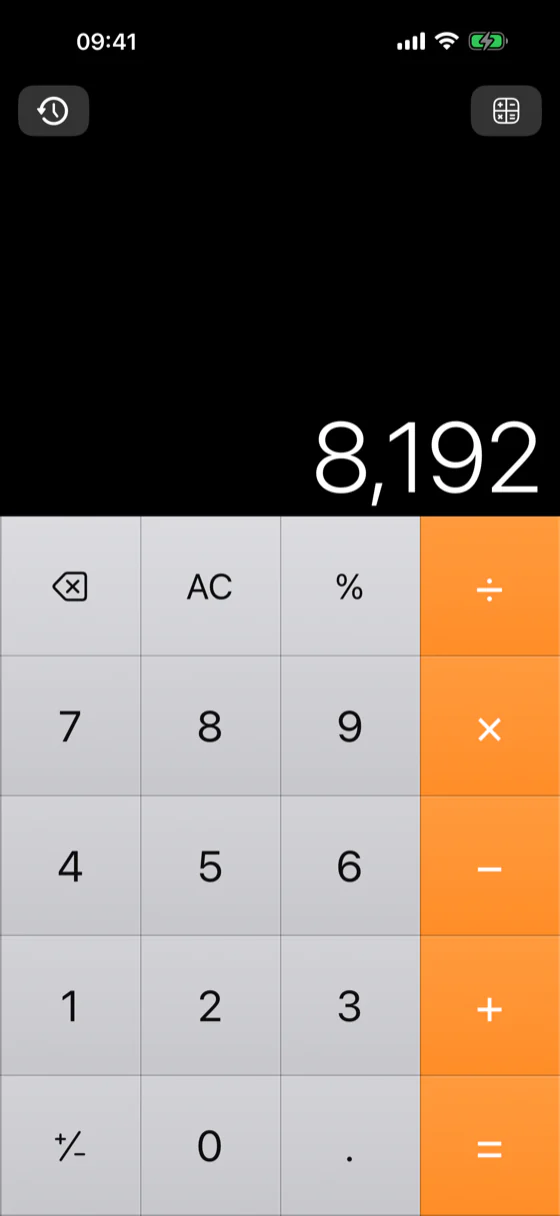
If you have been looking for the old iPhone calculator – the flat, edge-to-edge keypad where every tap landed exactly where you aimed it – Calc² is the closest thing you can install today. Same black display, same light square keys, same orange operator column. None of the round buttons you keep aiming at.


On the App Store now. The Android build is in closed testing.
One-time purchase. No ads, no subscription, no in-app purchases, no account, no tracking.
What Calc² is
Calc² is a paid calculator app for iPhone and iPad – with an Android build in closed testing – built around one idea: the keypad should be a grid of full squares with nothing between them. It has a basic keypad, a scientific keypad, a 16-category unit converter with live exchange rates, and a scrollable history of everything you have worked out. It is a one-time purchase with no ads, no subscription and no data collection.
It is meant to replace the calculator your phone came with – the one you open twenty times a day and quietly fight with.
Why it exists
One wrong digit is all it takes.
The invoice that does not add up. The tax return that is off by hundreds. The board you cut an inch short.
You did not calculate wrong. Your calculator made you miss.
Every calculator on a modern phone makes the same design choice: round keys, floating in space, with gaps between them. Underneath, most of them still listen to the whole square cell – but you cannot see that. What you can see is a circle covering about 79% of the key, so that is what your thumb goes for: a smaller target than the one that is actually there. You aim, you slow down, and at the edge of a key you hesitate. On the calculations that matter, that hesitation is where the wrong digit gets in.
Calc² goes back to the flat keypad that never asked you to aim: full squares, edge to edge, so the key you can see and the key you can hit are the same shape.
Round buttons make you aim. Squares do not.
The same four columns, drawn both ways. The shaded part is the key you cannot see.
Round keys · you can see 79% of each key
Calc² · the key and its paint are the same square
The visual dead zone: the part of the key that is never painted.
A circle inscribed in a square covers about 79% of it, so a fifth of every round key is never painted. That fifth is a dead zone to the eye, and the eye is what aims: you press the circle, which means you are pressing a button a fifth smaller than the one that is actually there. To be precise about the part people get wrong – the tap in that fifth usually still registers, the key underneath is the full square. It is not the touch that is lost, it is the target. Draw the keypad in squares and the two are the same thing again.
What you get
Everything the old one did, and the four things it never did.
Nothing to aim at
Full square buttons, edge to edge. No visual dead zone, so the key you can see is the whole key and your thumb goes straight down instead of hunting for the middle of a circle a fifth smaller than the button under it.
The scientific keypad, one tap away
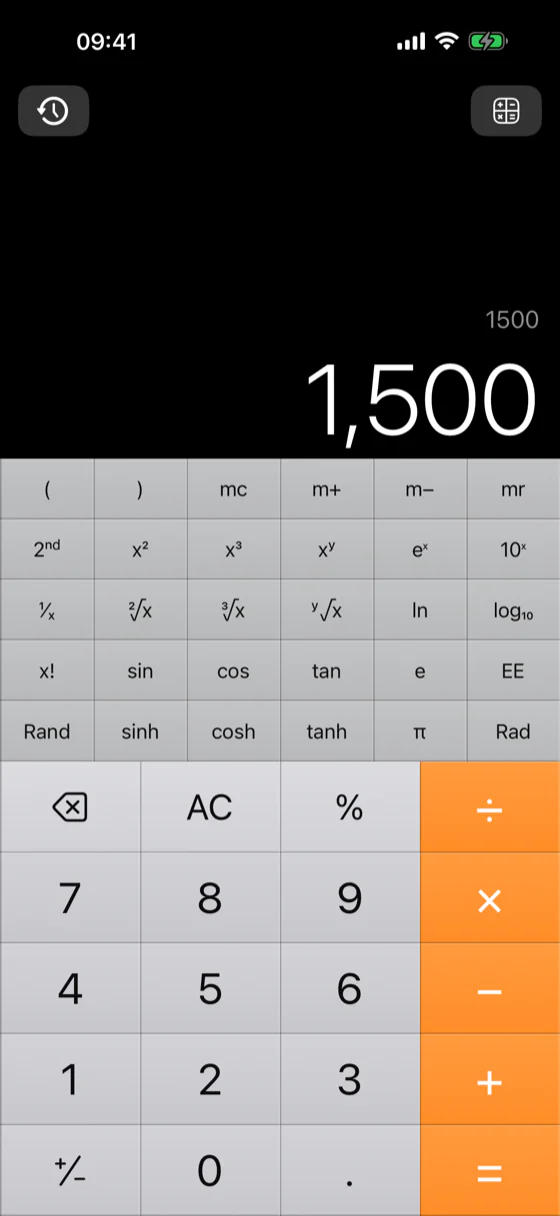
sin, cos, tan and their hyperbolic and inverse forms, ln and log, powers and roots, x!, π, e, EE, Rand, parentheses, memory keys and a Rad/Deg switch. Portrait or landscape.
A converter with 16 categories
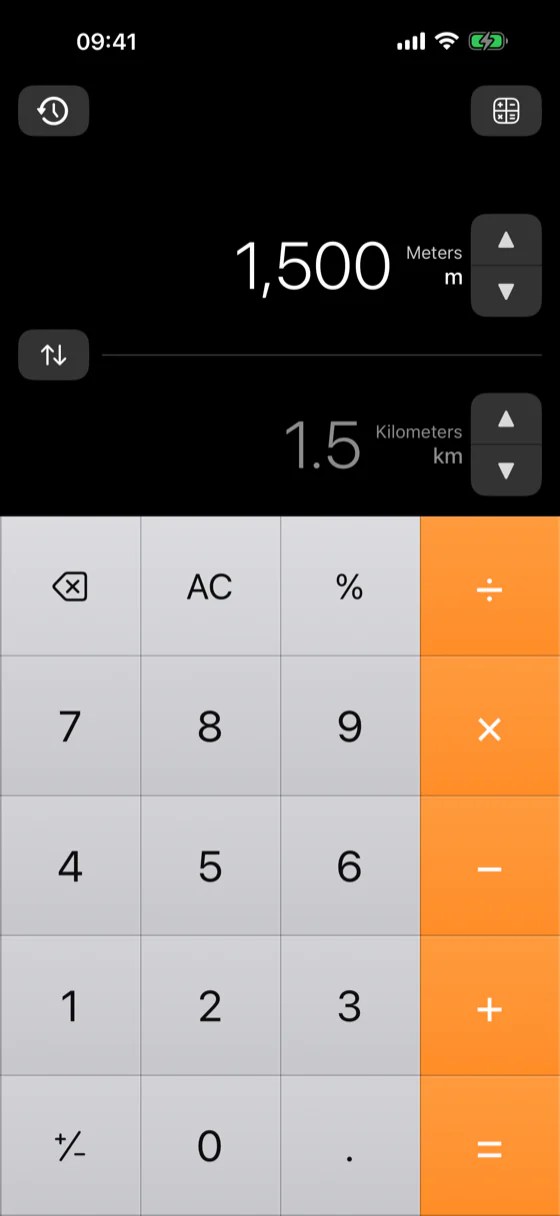
Length, area, volume, weight, temperature, speed, time, data, fuel, EV consumption, energy, power, pressure, force, angle and currency. Convert without leaving the app.
Live exchange rates
Currencies track the euro reference rates the European Central Bank publishes each working day, cached so the converter still works with no signal.
A history you can actually use
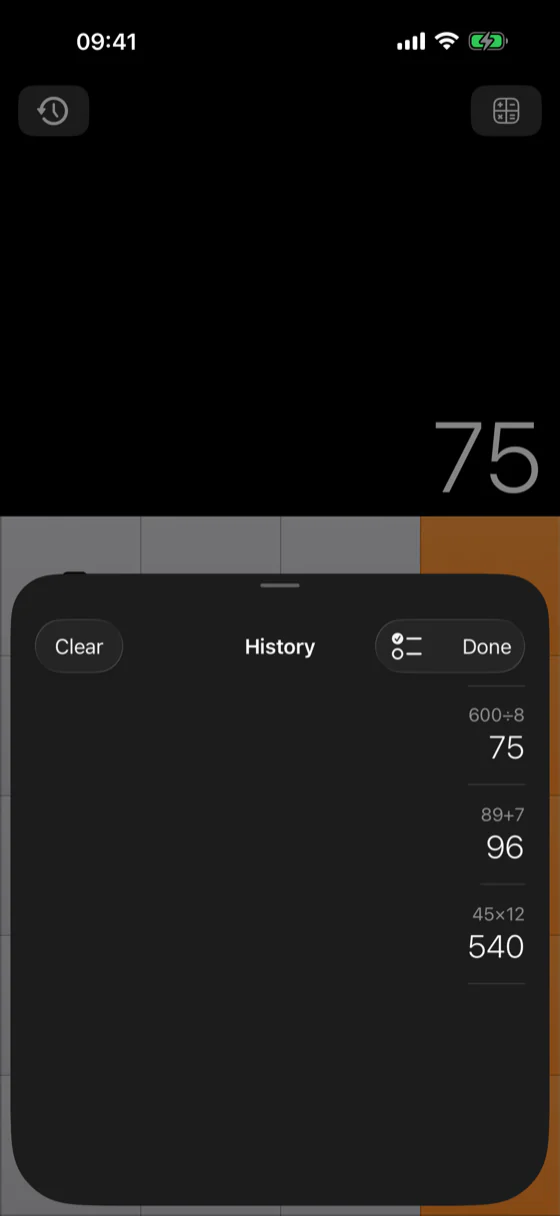
Every calculation, kept in a list one tap away. Scroll back, select, copy, delete, or clear the lot.
Percentages that behave the way you expect
Two rules, and you pick: convert percentages to decimals, or treat them as a proportional multiplier – the one you want for discounts.
Haptics with an off switch
Light, medium, strong or off. Very few calculators let you turn the buzzing all the way off. This one does.
A real layout on a big screen
On iPad and Android tablets the keypad keeps its half and the history or converter takes the other, the way desktop calculators have always worked.
30 languages
It follows your phone automatically. Digits, operators and unit codes stay universal everywhere.
Nothing leaves your phone
No account, no analytics, no tracking, no ads. History and settings live on the device and nowhere else.
Four screens, and that is the whole app.
No onboarding, no upsell, no tips carousel. It opens on the keypad.
Calc² against the calculator already on your phone
| Most built-in calculators | Calc² | |
|---|---|---|
| Key shape | Circles or heavily rounded keys, with space between them | Full squares that meet edge to edge |
| What you aim at | A circle covering about 79% of the key it sits on | The key itself, edge to edge |
| Scientific keys | Behind a rotation or a separate mode | One tap from the menu, portrait or landscape |
| Unit converter | Rarely included, usually a separate app | 16 categories, built in, with live currency rates |
| History | Often only the last result | Every calculation: scroll, select, copy, delete |
| Percentage rule | Fixed, whether or not it suits the job | Two rules, you choose |
| Haptics | Tied to system settings | Off, light, medium or strong |
| Cost | Included with the phone | One-time purchase. No ads, no subscription, no tracking |
At a glance
| Name | Calc² |
|---|---|
| What it is | A calculator app: basic, scientific, unit converter, history |
| Platforms | iPhone and iPad (iOS 17 and later), on the App Store now. Android phones and tablets (Android 8.0 and later), in closed testing |
| Price | One-time purchase, €2.99. No ads, no subscription, no in-app purchases |
| Data collected | None. No account, no analytics, no tracking |
| Works offline | Yes. Only currency rates need a connection, and the last set is cached |
| Converter categories | 16, including currency |
| Languages | 30, following the phone's language |
| Exchange rate source | European Central Bank daily euro reference rates |
| Developer | Tomas Lovniansky |
| Support | fx.fenom@gmail.com |
Questions people actually ask
What happened to the old iPhone calculator?
Apple has redesigned the built-in Calculator more than once, and every pass moved further from the flat, edge-to-edge grid people learned on: round keys, wider gaps between them, and more features layered on top. There is no setting that brings the old layout back, so the only way to get it is to install a separate app.
Can I get the old calculator back on my iPhone?
Not the system app itself. Neither iOS nor Android lets you restore an older version of a built-in app or swap it out. What you can do is install Calc² and put it where the built-in one used to sit: on the home screen, in the dock, or mapped to the side or action button on phones that have one. Calc² keeps the layout the old one had – black display, light square number keys, an orange operator column down the right side.
Is there a better calculator app than the one built into my phone?
It depends on what keeps going wrong for you. If you keep hitting the wrong key, the fix is the shape of the keypad rather than more features, and that is exactly what Calc² changes: the paint reaches the edge of every key, so what you aim at and what you hit are the same square. It also adds the three things the built-in one usually lacks – a scientific keypad one tap away, a unit converter with live currency rates, and a full calculation history. If what you need is graphing, symbolic algebra or a programmable tape, a heavier tool will serve you better.
Why do I keep missing buttons on the stock calculator?
Usually not because the tap fell outside the button. On most system calculators the whole square cell is still live, and a tap in the corner between two circles does register. What costs you is the aiming. A circle inscribed in a square covers about 79% of it, so a fifth of every key is unpainted, and your thumb corrects towards the middle of the circle instead of dropping straight down. That correction is what slows you down, and going fast is when the correction lands on the neighbour. Square keys that meet edge to edge remove it: what you can see is what you can hit.
Does Calc² work on Android too?
It will. It is the same app on both, built natively for each: iPhone and iPad on iOS 17 and later, Android phones and tablets on Android 8.0 and later, and the two look and behave the same on purpose, down to the icon set. The iOS version is on the App Store now; the Android one is in closed testing on Google Play and is not on sale yet.
Is Calc² free?
No. Calc² is a one-time purchase of €2.99 on the App Store. There are no ads, no subscription, no in-app purchases and no account. You buy it once and it is yours, including future updates on that platform.
Does Calc² collect any data?
No. Calc² has no analytics, no tracking and no account. Your history and settings are stored on the device and are never sent anywhere. See the privacy policy.
Does Calc² work offline?
Yes, apart from currency conversion. The converter refreshes its exchange rates from the European Central Bank's daily reference rates when you are online and falls back to the last set it downloaded when you are not. Everything else, including the scientific keypad and all fifteen non-currency converter categories, works with the radio off.
Does Calc² have a scientific mode?
Yes, and it is one tap from the menu rather than a rotation you have to remember. It carries sin, cos and tan with their hyperbolic and inverse forms, natural and base-10 logarithms, squares, cubes and arbitrary powers, square, cube and arbitrary roots, factorial, π, e, EE, a random number, parentheses, the four memory keys and a Rad/Deg switch. It works in portrait and in landscape.
Can Calc² convert units and currencies?
Yes, in 16 categories: length, area, volume, weight, temperature, speed, time, data, fuel consumption, EV consumption, energy, power, pressure, force, angle and currency. The converted value updates underneath as you type.
Does Calc² keep a history of my calculations?
Yes. Every calculation goes into a list you can open in one tap, scroll back through, select from, copy out, delete individually or clear entirely.
What languages does Calc² speak?
30, and it follows your phone's language automatically with no setting to find. Digits, operators and unit codes stay universal, so a keypad is a keypad in every one of them. In right-to-left languages the menus flip and the keypad deliberately does not.
Does it work on iPad and Android tablets?
Yes, and not as a stretched phone layout. On a big screen the calculator keeps one half and the history or the converter takes the other, side by side, the way desktop calculators have always been laid out.
When the numbers matter, the buttons matter.
Replace your system calculator with the one whose keys are the size they look.
On the App Store now. The Android build is in closed testing.